For the
4/9 Art of Memories Challenge, we were asked to use a photo as the entire background in black and white, blend one or more patterned papers into the photo, highlight at least 2 parts of the photo in frames and in color, and use at least two clusters.
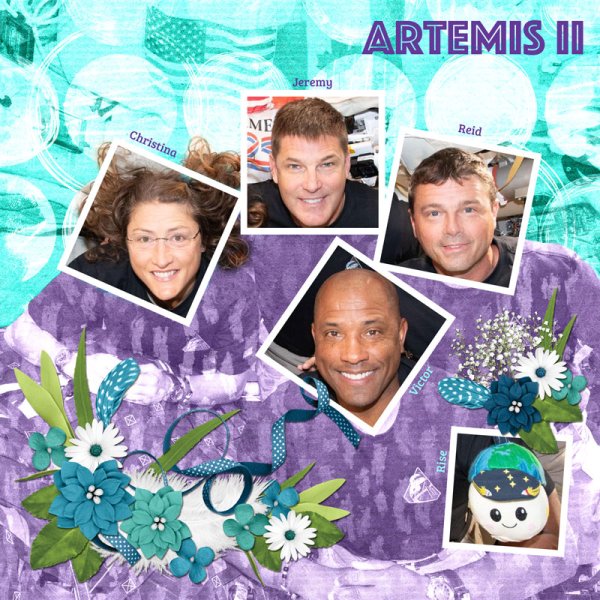
To create this layout, I started with a photo of the Artemis II crew who recently flew around the moon and back. I copied the photo and used a Black & White adjustment layer in Photoshop to make the copy of the photo black and white. I positioned the black and white photo layer underneath the color photo layer.
Next I created square frames for the four crew members and their zero gravity indicator "Rise." I used the polygonal lasso tool to outline the area within all the frames and used this selection as a layer mask for the color photo. Then I used a soft brush on the mask to allow all of Christina's curls to also be in color.
At this point, I tested various papers to see which patterns I liked best. The upper part of this photo is light in tone, while the lower part of the photo is dark in tone. So, I decided to use two different patterns. The teal dots worked better on the upper part of the photo and the purple brush strokes worked better on the lower part. I masked each patterned paper to show up where I wanted to and used blending modes to achieve the blending effects.
Then, I created two clusters, a corner cluster in the lower left and a spot cluster above Rise. I used layer masking to weave the ribbon over and under various objects. I added each of their names and finally the title: Artemis II.